Stew on this: you aren’t being slighted if you don’t buy the latest and greatest MacBook Pro or Ultrabook computer. In fact, we’d argue you’re coming out stronger than someone who does. That’s because, unlike those with more lavish tastes, you have the privilege of being able to save your money for whatever else you’d like. Honestly, that’s nothing to take lightly. You might not get the fastest processor, but you can expect a better value from the budget laptops below.
On our list specifically, we’ve denoted the best budget laptops in no particular order. In doing so, of course, this means we’ve had to go hands-on with every clamshell notebook we could find for under half a grand. So, if you’re looking to save money this year into the next, you can take solace knowing that what we’ve arranged below is more than just another uninformed top 10 list – this one comes from a place of experience and calculated research.
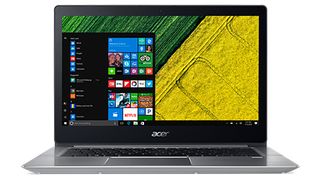
The bigger, better value proposition
CPU: Intel Core i3 – i7 | Graphics: Intel HD Graphics 620 | RAM: 4GB – 8GB | Screen: 14-inch FHD (1,920 x 1,080) ComfyView IPS | Storage: 128GB – 256GB SSD
Here we have one of the few budget laptops with a processor nearly equivalent to the MacBook Pro, that is, if you opt for the Intel Core i5 configuration. The best part? It’s roughly half the cost of its Apple-branded rival. Now given that it sells at a range of different prices, the Acer Swift 3 can be an obtuse purchase, but lucky for you, the midrange model will get you by just fine.
Read the full review: Acer Swift 3

Spiritual successor to the Surface 3
CPU: Intel Pentium Quad Core N4200 | Graphics: Intel HD Graphics 505 | RAM: 4GB | Screen: 12.2-inch (1920 x 1200) IPS LCD | Storage: 64GB
Hear ye, the Acer Switch 3 is a feat to behold. This cheap laptop uses a low-power, albeit astoundingly efficient, Intel Pentium processor. However, internal specs are the least of its appeal. No, that honor goes to the Acer Switch 3’s novel ability to detach its screen from its keyboard. That only scratches the ‘surface’ of the inspiration it’s taken from Microsoft’s hardware too.
Read the full review: Acer Switch 3
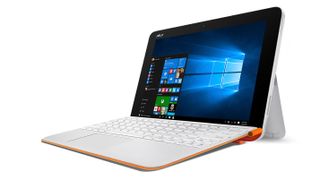
Small, portable and flexible
CPU: Intel Atom x5-Z8350 | Graphics: Integrated Intel HD Graphics | RAM: 4GB | Screen: 10.1-inch HD (1,280 x 800) LED touch display | Storage: 64GB
Its name is alphabet soup to the average reader, but then again this convertible laptop has always been about function over form. For one minuscule transaction, you’re getting a tablet equipped with an included keyboard and even a fingerprint scanner for more secure logins. Along with reliable performance and a magnesium-alloy chassis, it’s built to last.
Read the full review: Asus Transformer Mini T102HA
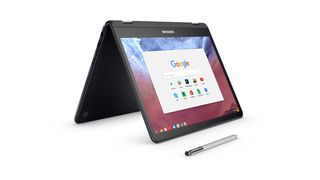
First in a new generation of Chromebooks
CPU: 0.99Ghz Intel Core m3-6Y30 | Graphics: Intel HD Graphics 515 | RAM: 4GB | Screen: 12.3-inch, QHD (2,400 x 1,600) touchscreen | Storage: 32GB eMMC
With Android apps now supported on every new Chromebook released, it only makes sense to craft a Chromebook with a 12.3-inch QHD touch display, with a 360-degree hinge and pen support to boot. The Samsung Chromebook Pro may have a keyboard that’s a bit too compact for comfort, but it more than makes up for it, going as far as to master pen input on the first try.
Read the full review: Samsung Chromebook Pro
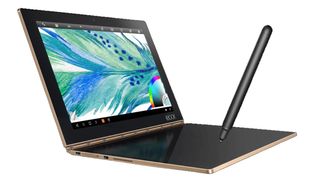
The netbook of the future – the ultra netbook?
CPU: 1.44GHz Intel Atom x5-Z8550 | Graphics: Intel HD Graphics 400 | RAM: 4GB | Screen: 10.1-inch FHD (1,920 x 1,200 resolution), IPS touchscreen | Storage: 64GB flash storage (plus 128GB with microSD)
If you thought the Android edition of the Yoga Book was impressive, imagine using Windows on a laptop sporting inputs that double as a Wacom digitizer. The Windows 10 version of the Lenovo Yoga Book is exactly that, and while its on-paper specs leave something to be desired, the purely touch-based keyboard is so revolutionary we can’t believe nobody has copied it yet.
Read the full review: Lenovo Yoga Book
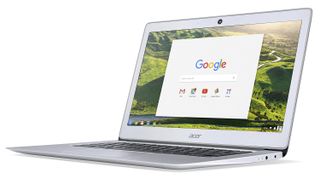
Meet the anti-MacBook Air
CPU: Intel Celeron N3160 | Graphics: Intel HD Graphics 400 | RAM: 4GB | Screen: 14-inch FHD (1,920 x 1,080) display | Storage: 32GB SSD
With its slick lines and a slim silhouette, the Acer Chromebook 14 makes for a subtle, snazzy laptop. Although its display isn't the most attractive we've seen, it’s still acceptable for full HD. On top of that, the keyboard and trackpad adhere to the principle of ‘it just works.’ The battery life is satisfactory as well despite falling a bit south of Acer's 12-hour claim in real-world use.
Read the full review: Acer Chromebook 14
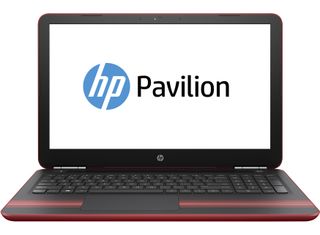
The de facto learning laptop lives on
CPU: AMD dual-core A9 APU – Intel Core i7 | Graphics: AMD Radeon R5 – Nvidia GTX 1050 | RAM: 6GB – 16GB | Screen: 15.6-inch HD (1,366 x 768) – FHD (1,920 x 1,080); touch optional | Storage: 512GB SSD – 1TB HDD
Frankly, this is a broke college student’s laptop, so as long as you go in with that in mind, you won’t be disappointed with the HP Pavilion 15. Possessing all the power you’ll need to get you through the semester, this laptop bears all of the essentials for an affordable price, so that you can save the rest of your cash for the crushing financial aid debt yet to come.
Read our hands-on review: HP Pavilion 15
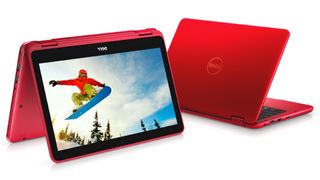
Colorful can be cheap, too
CPU: Intel Celeron N3060 | Graphics: Intel HD Graphics | RAM: 2GB | Screen: 11.6-inch HD (1366 x 768) anti-glare LED-backlit display | Storage: 32GB eMMC
For those who like their laptops as colorful as they are affordable, the Dell Inspiron 11 3000 is a no-brainer. Although some users might find that it’s 11.6-inch display is too small, we would argue that this budget laptop is the perfect fit for your portable workspace. Plus, its bright and vibrant color scheme is loud enough that no one on your flight will confuse it for their own.

A simple and reliable laptop
CPU: Intel Celeron N3160 | Graphics: Intel HD Graphics 400 | RAM: 2GB | Screen: 11.6-inch HD (1366 x 768) anti-glare | Storage: 32GB
You could argue that, with the IdeaPad 110s, Lenovo has one-upped the Dell Inspiron 11, at least as far as 11.6-inchers go. You’re still getting an HD screen and a Celeron processor, but you’re also getting the added bonus of a full-size SD card reader and a 7-hour battery life – that’s more than you can say for most Ultrabooks. It costs a little more, but it’s worth it.
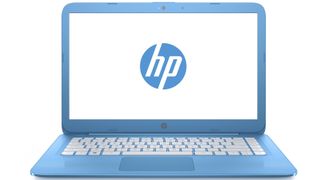
Big and colorful for cheap
CPU: Intel Celeron N3060 | Graphics: Intel HD Graphics 400 | RAM: 4GB | Screen: 14-inch HD (1,366 x 768) SVA BrightView WLED-backlit | Storage: 32GB eMMC
With a starting price of just above 200 large, the HP Stream 14 is a fine value for those seeking a strong if basic web browsing machine. It's cheaper than even some Chromebooks while offering a bigger screen and the fullness of Windows 10. Other 15-inchers lack the ergonomics and aesthetics of HP’s cheapest Windows laptop yet.
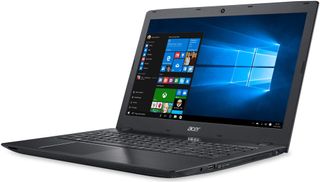
Mighty impressive for the price
CPU: Intel Core i3-6100U | Graphics: Intel HD Graphics 520 | RAM: 4GB – 32GB | Screen: 15.6-inch HD (1,366 x 768) display | Storage: 1TB hard drive
Available in a variety of colors, this number from Acer brings things into practically a whole new class, with a 15.6-inch HD display powered by an Intel Core i3 processor. The metallic frame should make using this device feel more like a luxury without the sticker shock. Plus, with up to 12.5 hours of claimed battery life, this should last at least once forgetting to charge it.
Gabe Carey has also contributed to this article
posted by Campus94


 Hello, my name is Jack Sparrow. I'm a 50 year old self-employed Pirate from the Caribbean.
No comments:
Post a Comment